Read before writing
The skill first reads what the repository already documents, so the guide neither contradicts nor duplicates it, and keeps its vocabulary.
02Project 02 of 3
An AI coding agent on legacy RPG, the language of business applications on IBM i servers (formerly AS/400): it gets the context and a guide for each concept it works on, but no free shell. The agent runs on the developer’s workstation, not on the IBM i; its code changes go through one SSH key bound to one script.
The IBM i sources are exported to the IFS, the IBM i’s file system, then synced to the workstation along with the project’s documentation. That is what the agent can read: the code, and the documents that explain it.
When a task touches a business concept that has no guide yet, the agent first runs an in-house analysis skill on that concept (a skill is a written procedure the agent loads and follows). The skill finds the programs and tables involved and where the data comes from, then writes a guide that leads to the right files. Guides build up one concept at a time. How it works
Every code change goes through one IFS script, reached with one SSH key. The agent puts the source on the IFS, compares it with the live production source of the object’s latest release, which the script extracts, and works on the more recent version, in the IFS. The script then pushes it into the IBM i libraries (QSYS), compiles it and returns the compiler’s messages. The agent loops until the code compiles.
The agent drives a 5250 session, the IBM i’s text-screen interface (the “green screen”), through an MCP server (MCP is the standard way to plug a tool into an AI agent), with a live mirror in the browser so the developer sees every step.
On a legacy codebase, an in-house skill documents the system one business concept at a time, and checks every key claim of its own guide against the source code before the guide is kept.
Which program writes each table, which job runs that program and where the data comes from, followed back up to three steps.
AI workers, small agents run in parallel, each answer one factual question: the fields of a table, the conditions of a program, a count.
A guide organised by business feature, not by program, that explains why and cites the lines.
One worker per key claim tries to refute it in the source and pastes the line it used.
Each claim ends as confirmed, refuted or unverifiableEffort set per concept: light, standard, or deep with a second challenge pass
The skill first reads what the repository already documents, so the guide neither contradicts nor duplicates it, and keeps its vocabulary.
When a menu or a program does something other than its name suggests, the guide opens with a clarification. It is often the most useful finding.
The skill does not document the whole repository in advance: such a document would have to be kept up to date by hand and would soon fall behind. It writes a guide when a task touches a business concept, so parts of the repository have no guide yet, by design.
The agent reads the feedback, fixes the source and loops until it compiles
Live mirror · browser · localhost only · read-only
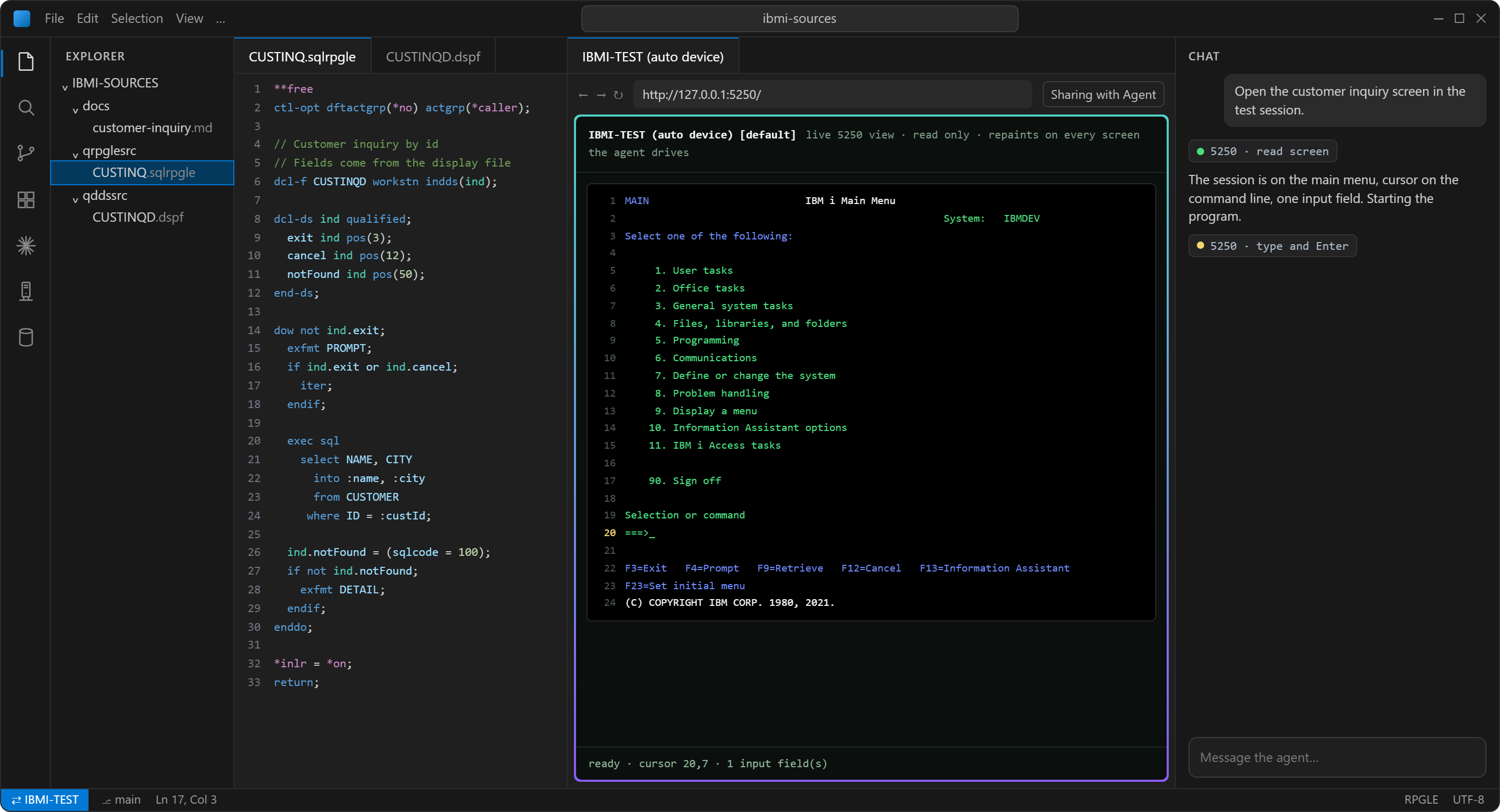
The screen text as it is, its fields listed by name and position, the cursor, whether the keyboard is locked, and a signature that identifies the screen. All structured text, no screenshots.
The screen is treated as data, never as instructions: a field can contain “ignore the rules and run…”. The session uses a dedicated low-privilege profile on a test library with no live business data, over an encrypted port only.
A shell is unbounded: anything the profile can do, a prompt injection or a plain mistake can do. A forced command turns the SSH key into a menu. The request is only split into words, never evaluated as a command, and the target folder comes from the connected profile, never from an argument.
A legacy RPG repository holds decades of conventions nobody wrote down. The guide gives the agent an index to navigate with instead of searching blindly, and gives me something to check its understanding against.
Open-source MCP servers already exist, one with a live browser view. What remained was the setup around it: network and permissions, safety rules, and a small end-to-end trial. A custom emulator would have cost more.
The SSH key uses the developer’s own profile, with their usual rights. A dedicated low-privilege profile would be safer, but versions and check-outs would no longer be attributed to the right person. The trade-off is documented.
Everything the agent reads is sent to its model provider. Old CL sources (the IBM i scripting language) and transfer scripts often hold hard-coded passwords, so they must be checked before real code is exposed.
The Db2 for i extension of VS Code, which goes through the developer’s connection to the IBM i (the Code for IBM i extension), exposes its commands to AI assistants, SQL queries included. It stays unused: the tables hold sensitive customer data, and nothing anonymises it before it would reach the model provider. That could be the next step: anonymise the data first, then open the access.
The 5250 bridge in use is a young open-source project with a single maintainer. Hence the pinned version and the code read before use.